
RGB vs CMYK Color Guide
What is Difference in RGB vs CMYK Colors
Computer monitors emit color as RGB (red, green, blue) light. Although all colors of the visible spectrum can be produced by merging red, green and blue light, monitors are capable of displaying only a limited gamut (i.e., range) of the visible spectrum.
Whereas monitors emit light, inked paper absorbs or reflects specific wavelengths. Cyan, magenta and yellow pigments serve as filters, subtracting varying degrees of red, green and blue from white light to produce a selective gamut of spectral colors. Like monitors, printing inks also produce a color gamut that is only a subset of the visible spectrum, although the range is not the same for both. Consequently, the same art displayed on a computer monitor may not match to that printed in a publication. Also, because printing processes such as offset lithography use CMYK (cyan, magenta, yellow, black) inks, digital art must be converted to CMYK color for print.
CMYK versus RGB color spectrum
What is CMYK Color Cyan, Magenta, Yellow -
Subtractive colors
Some printers may prefer your files be delivered in RGB with ICC profiles attached, as this allows the printer to use color management methods when converting to CMYK. Other printers may prefer your files in the CMYK mode, as this is the mode required for the printing process. If an RGB file is submitted, it must be converted to CMYK for print.
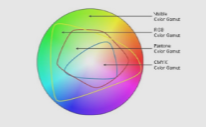
Visible color spectrum with print gamut
It can sometimes be difficult to visualize the reason for color shift in color space conversion. The best way to see the color differences between the CMYK and RGB color spaces is to look at a color gamut comparison chart. The chart to the left plots the visible color spectrum as the large "horse shoe" area, and within this is a plot of the CMYK colors, and the RGB colors. You can see that in some areas the RGB color space is "outside" that of the CMYK space.
Desktop scanners & color space
Most desktop scanners, digital cameras, and video capture systems save files as RGB and the conversion of RGB files to CMYK can be done in many ways. RGB converts to only CMY directly. However, when printing, we must add black ink and in doing so must cut back on some color. The Undercolor Removal setup will help control this ratio so that a maximum ink density for the four colors will be 300% when printing on a coated paper stock.
Spot colors
Digital art that is comprised of spot colors generally requires conversion to the CMYK color space to enable file use. Because color gamut for spot color libraries extends beyond the ranges of the CMYK color gamut, some spot colors may not be represented effectively using CMYK process inks.

Halftoning screen angles 133dpi 40% screen enlarged
Image halftones
In offset lithography, the density of CMYK inks can not be varied in continuous fashion across an image, so a range is produced by means of halftoning. In halftoning, translucent CMYK ink dots of variable size are printed in overlapping grids. Grids are placed at different angles for each of the ink colors.